Anthropic기술 블로그
데스크톱 확장 기능: Claude Desktop에서 MCP 서버를 원클릭으로 설치하기
Claude Desktop 확장 기능: 원클릭으로 MCP 서버를 설치하는 Claude Desktop
파일 확장자 변경
Sep 11, 2025
Claude Desktop Extensions의 파일 확장자가 .dxt에서 .mcpb(MCP Bundle)로 변경되었습니다. 기존 .dxt 확장 프로그램은 계속 정상 작동하지만, 앞으로 새 확장 프로그램을 만들 때는 .mcpb를 사용하시길 권장합니다. 기능상의 변화는 전혀 없으며, 순수하게 네이밍 컨벤션만 바뀐 것입니다.
—
지난해 Model Context Protocol(MCP)을 공개한 이후, 개발자들이 파일 시스템부터 데이터베이스까지 다양한 리소스에 Claude가 접근할 수 있도록 훌륭한 로컬 서버를 구축하는 모습을 지켜봤습니다. 하지만 같은 피드백이 계속 돌아왔습니다. 설치 과정이 너무 복잡하다는 것이었습니다. 사용자는 개발자 도구를 설치해야 하고, 설정 파일을 직접 편집해야 하며, 의존성 문제에 막히는 경우도 빈번했습니다.
오늘, MCP 서버 설치를 버튼 클릭 한 번만큼 간단하게 만들어주는 새로운 패키징 포맷, Desktop Extensions를 소개합니다.
MCP 설치 문제 해결하기
로컬 MCP 서버는 Claude Desktop 사용자에게 강력한 기능을 제공합니다. 로컬 애플리케이션과 상호작용하고, 비공개 데이터에 접근하며, 개발 도구와 연동할 수 있습니다. 이 모든 과정에서 데이터는 사용자의 기기를 벗어나지 않습니다. 하지만 현재의 설치 과정은 상당한 진입 장벽을 만들고 있었습니다:
- 개발자 도구 필요: Node.js, Python 등 런타임을 별도로 설치해야 함
- 수동 설정: 서버마다 JSON 설정 파일을 직접 편집해야 함
- 의존성 관리: 패키지 충돌과 버전 불일치를 사용자가 직접 해결해야 함
- 탐색 수단 부재: 유용한 MCP 서버를 찾으려면 GitHub을 직접 뒤져야 함
- 업데이트의 번거로움: 서버를 최신 상태로 유지하려면 수동으로 재설치해야 함
이런 마찰 요소들 때문에 MCP 서버는 강력한 기능에도 불구하고 비개발자 사용자에게는 사실상 접근하기 어려운 영역으로 남아 있었습니다.
Desktop Extensions 소개
Desktop Extensions(.mcpb 파일)는 MCP 서버 전체를 모든 의존성과 함께 하나의 설치 가능한 패키지로 묶어 이 문제들을 해결합니다. 사용자 경험이 어떻게 달라지는지 살펴보겠습니다:
이전:
# Install Node.js first
npm install -g @example/mcp-server
# Edit ~/.claude/claude_desktop_config.json manually
# Restart Claude Desktop
# Hope it works
이후:
.mcpb파일 다운로드- 더블 클릭으로 Claude Desktop에서 열기
- "Install" 클릭
이게 전부입니다. 터미널도, 설정 파일도, 의존성 충돌도 없습니다.
아키텍처 개요
Desktop Extension은 로컬 MCP 서버와 manifest.json을 포함하는 zip 아카이브입니다. manifest.json에는 Claude Desktop과 Desktop Extensions를 지원하는 다른 앱이 알아야 할 모든 정보가 기술되어 있습니다.
extension.mcpb (ZIP archive)
├── manifest.json         # Extension metadata and configuration
├── server/               # MCP server implementation
│   └── [server files]
├── dependencies/         # All required packages/libraries
└── icon.png             # Optional: Extension icon

# Example: Node.js Extension
extension.mcpb
├── manifest.json         # Required: Extension metadata and configuration
├── server/               # Server files
│   └── index.js          # Main entry point
├── node_modules/         # Bundled dependencies
├── package.json          # Optional: NPM package definition
└── icon.png              # Optional: Extension icon

# Example: Python Extension
extension.mcpb (ZIP file)
├── manifest.json         # Required: Extension metadata and configuration
├── server/               # Server files
│   ├── main.py           # Main entry point
│   └── utils.py          # Additional modules
├── lib/                  # Bundled Python packages
├── requirements.txt      # Optional: Python dependencies list
└── icon.png              # Optional: Extension icon
Desktop Extension에서 필수 파일은 manifest.json 하나뿐입니다. 나머지 복잡한 처리는 Claude Desktop이 알아서 합니다:
- 내장 런타임: Claude Desktop에 Node.js를 내장 제공하므로 외부 의존성이 불필요
- 자동 업데이트: 새 버전이 나오면 확장 프로그램이 자동으로 업데이트
- 안전한 시크릿 관리: API 키 같은 민감한 설정 값은 OS 키체인에 저장
매니페스트에는 사람이 읽을 수 있는 정보(이름, 설명, 제작자 등), 기능 선언(도구, 프롬프트), 사용자 설정, 런타임 요구 사항이 포함됩니다. 대부분의 필드가 선택 사항이라 최소 구성은 꽤 짧지만, 실제로는 지원되는 세 가지 확장 유형(Node.js, Python, 그리고 일반 바이너리/실행 파일) 모두 파일을 포함하게 될 것입니다:
{
  "mcpb_version": "0.1",                    // MCPB spec version this manifest conforms to
  "name": "my-extension",                   // Machine-readable name (used for CLI, APIs)
  "version": "1.0.0",                       // Semantic version of your extension
  "description": "A simple MCP extension",  // Brief description of what the extension does
  "author": {                               // Author information (required)
    "name": "Extension Author"              // Author's name (required field)
  },
  "server": {                               // Server configuration (required)
    "type": "node",                         // Server type: "node", "python", or "binary"
    "entry_point": "server/index.js",       // Path to the main server file
    "mcp_config": {                         // MCP server configuration
      "command": "node",                    // Command to run the server
      "args": [                             // Arguments passed to the command
        "${__dirname}/server/index.js"      // ${__dirname} is replaced with the extension's directory
      ]
    }
  }
}
매니페스트 스펙에는 로컬 MCP 서버의 설치와 구성을 더 쉽게 만들어주는 다양한 편의 옵션이 마련되어 있습니다. 서버 설정 객체는 템플릿 리터럴 형태의 사용자 정의 설정과 플랫폼별 오버라이드를 모두 수용할 수 있도록 정의할 수 있습니다. 확장 프로그램 개발자는 사용자로부터 어떤 종류의 설정을 수집할지 세밀하게 정의할 수 있습니다.
매니페스트가 설정을 어떻게 돕는지 구체적인 예시를 살펴보겠습니다. 아래 매니페스트에서 개발자는 사용자가 api_key을 제공해야 한다고 선언합니다. Claude는 사용자가 해당 값을 입력하기 전까지 확장 프로그램을 활성화하지 않으며, 입력된 값은 운영체제의 시크릿 저장소에 자동으로 보관합니다. 그리고 서버를 시작할 때 ${user_config.api_key}를 사용자가 입력한 값으로 투명하게 치환합니다. 마찬가지로 ${__dirname}은 확장 프로그램이 압축 해제된 디렉터리의 전체 경로로 치환됩니다.
{
  "mcpb_version": "0.1",
  "name": "my-extension",
  "version": "1.0.0",
  "description": "A simple MCP extension",
  "author": {
    "name": "Extension Author"
  },
  "server": {
    "type": "node",
    "entry_point": "server/index.js",
    "mcp_config": {
      "command": "node",
      "args": ["${__dirname}/server/index.js"],
      "env": {
        "API_KEY": "${user_config.api_key}"
      }
    }
  },
  "user_config": {
    "api_key": {
      "type": "string",
      "title": "API Key",
      "description": "Your API key for authentication",
      "sensitive": true,
      "required": true
    }
  }
}
대부분의 선택 필드를 포함한 전체 manifest.json 예시는 다음과 같습니다:
{
  "mcpb_version": "0.1",
  "name": "My MCP Extension",
  "display_name": "My Awesome MCP Extension",
  "version": "1.0.0",
  "description": "A brief description of what this extension does",
  "long_description": "A detailed description that can include multiple paragraphs explaining the extension's functionality, use cases, and features. It supports basic markdown.",
  "author": {
    "name": "Your Name",
    "email": "yourname@example.com",
    "url": "https://your-website.com"
  },
  "repository": {
    "type": "git",
    "url": "https://github.com/your-username/my-mcp-extension"
  },
  "homepage": "https://example.com/my-extension",
  "documentation": "https://docs.example.com/my-extension",
  "support": "https://github.com/your-username/my-extension/issues",
  "icon": "icon.png",
  "screenshots": [
    "assets/screenshots/screenshot1.png",
    "assets/screenshots/screenshot2.png"
  ],
  "server": {
    "type": "node",
    "entry_point": "server/index.js",
    "mcp_config": {
      "command": "node",
      "args": ["${__dirname}/server/index.js"],
      "env": {
        "ALLOWED_DIRECTORIES": "${user_config.allowed_directories}"
      }
    }
  },
  "tools": [
    {
      "name": "search_files",
      "description": "Search for files in a directory"
    }
  ],
  "prompts": [
    {
      "name": "poetry",
      "description": "Have the LLM write poetry",
      "arguments": ["topic"],
      "text": "Write a creative poem about the following topic: ${arguments.topic}"
    }
  ],
  "tools_generated": true,
  "keywords": ["api", "automation", "productivity"],
  "license": "MIT",
  "compatibility": {
    "claude_desktop": ">=1.0.0",
    "platforms": ["darwin", "win32", "linux"],
    "runtimes": {
      "node": ">=16.0.0"
    }
  },
  "user_config": {
    "allowed_directories": {
      "type": "directory",
      "title": "Allowed Directories",
      "description": "Directories the server can access",
      "multiple": true,
      "required": true,
      "default": ["${HOME}/Desktop"]
    },
    "api_key": {
      "type": "string",
      "title": "API Key",
      "description": "Your API key for authentication",
      "sensitive": true,
      "required": false
    },
    "max_file_size": {
      "type": "number",
      "title": "Maximum File Size (MB)",
      "description": "Maximum file size to process",
      "default": 10,
      "min": 1,
      "max": 100
    }
  }
}
확장 프로그램과 매니페스트의 실제 예시는 MCPB 저장소의 예제를 참고하세요.
manifest.json의 필수 및 선택 필드에 대한 전체 명세는 오픈소스 툴체인에서 확인할 수 있습니다.
첫 번째 확장 프로그램 만들기
기존 MCP 서버를 Desktop Extension으로 패키징하는 과정을 단계별로 살펴보겠습니다. 여기서는 간단한 파일 시스템 서버를 예시로 사용합니다.
1단계: 매니페스트 생성
먼저, 서버의 매니페스트를 초기화합니다:
npx @anthropic-ai/mcpb init이 대화형 도구는 서버에 대한 정보를 질문한 뒤 완성된 manifest.json을 자동 생성합니다. 가장 기본적인 manifest.json을 빠르게 만들고 싶다면 --yes 파라미터를 붙여 실행하면 됩니다.
2단계: 사용자 설정 처리
서버에서 API 키나 허용 디렉터리 같은 사용자 입력이 필요하다면, 매니페스트에 다음과 같이 선언합니다:
"user_config": {
  "allowed_directories": {
    "type": "directory",
    "title": "Allowed Directories",
    "description": "Directories the server can access",
    "multiple": true,
    "required": true,
    "default": ["${HOME}/Documents"]
  }
}
Claude Desktop은 다음을 수행합니다:
- 사용자 친화적인 설정 UI 표시
- 확장 프로그램 활성화 전 입력값 유효성 검사
- 민감한 값의 안전한 저장
- 개발자 설정에 따라 인자 또는 환경 변수 형태로 서버에 설정값 전달
아래 예시에서는 사용자 설정을 환경 변수로 전달하지만, 인자 형태로도 전달할 수 있습니다.
"server": {
   "type": "node",
   "entry_point": "server/index.js",
   "mcp_config": {
   "command": "node",
   "args": ["${__dirname}/server/index.js"],
   "env": {
      "ALLOWED_DIRECTORIES": "${user_config.allowed_directories}"
   }
   }
}
3단계: 확장 프로그램 패키징
모든 파일을 하나의 .mcpb 파일로 묶습니다:
npx @anthropic-ai/mcpb pack이 명령은 다음을 수행합니다:
- 매니페스트 유효성 검사
.mcpb아카이브 생성
4단계: 로컬 테스트
.mcpb 파일을 Claude Desktop의 설정 창으로 드래그하면 다음 정보를 확인할 수 있습니다:
- 사람이 읽을 수 있는 형태의 확장 프로그램 정보
- 필요한 권한 및 설정 항목
- 간단한 "설치" 버튼
고급 기능
크로스 플랫폼 지원
확장 프로그램은 운영체제에 따라 동작을 다르게 설정할 수 있습니다:
"server": {
  "type": "node",
  "entry_point": "server/index.js",
  "mcp_config": {
    "command": "node",
    "args": ["${__dirname}/server/index.js"],
    "platforms": {
      "win32": {
        "command": "node.exe",
        "env": {
          "TEMP_DIR": "${TEMP}"
        }
      },
      "darwin": {
        "env": {
          "TEMP_DIR": "${TMPDIR}"
        }
      }
    }
  }
}
동적 설정
템플릿 리터럴을 사용해 런타임 값을 참조할 수 있습니다:
${__dirname}: 확장 프로그램의 설치 디렉터리${user_config.key}: 사용자가 입력한 설정 값${HOME}, ${TEMP}: 시스템 환경 변수
기능 선언
확장 프로그램이 제공하는 기능을 사용자에게 미리 안내할 수 있습니다:
"tools": [
  {
    "name": "read_file",
    "description": "Read contents of a file"
  }
],
"prompts": [
  {
    "name": "code_review",
    "description": "Review code for best practices",
    "arguments": ["file_path"]
  }
]
확장 프로그램 디렉터리
Claude Desktop에 내장된 큐레이션 기반 확장 프로그램 디렉터리를 함께 출시합니다. GitHub에서 직접 검색하거나 코드를 검증할 필요 없이, 사용자가 확장 프로그램을 탐색·검색하고 클릭 한 번으로 설치할 수 있습니다.
Desktop Extension 사양과 macOS·Windows용 Claude 구현체는 앞으로 계속 발전해 나갈 예정입니다. 확장 프로그램을 통해 Claude의 기능을 창의적으로 확장하는 다양한 사례를 기대하고 있습니다.
확장 프로그램을 제출하려면:
- 제출 양식에 안내된 가이드라인을 준수하세요
- Windows와 macOS 양쪽에서 테스트하세요
- 확장 프로그램을 제출하세요
- Anthropic 팀이 품질과 보안을 검토합니다
개방형 생태계 구축
Anthropic은 MCP 서버를 둘러싼 개방형 생태계에 깊이 헌신하고 있으며, 여러 애플리케이션과 서비스에서 범용적으로 채택될 수 있는 점이 커뮤니티에 큰 도움이 되었다고 생각합니다. 이러한 철학에 맞추어, Desktop Extension 사양, 툴체인, 그리고 macOS·Windows용 Claude가 Desktop Extension을 지원하는 데 사용하는 스키마와 핵심 함수를 오픈소스로 공개합니다. MCPB 포맷이 Claude뿐 아니라 다른 AI 데스크톱 애플리케이션에서도 로컬 MCP 서버의 이식성을 높이는 데 기여하길 바랍니다.
오픈소스로 공개하는 항목은 다음과 같습니다:
- MCPB 사양 전체
- 패키징 및 유효성 검사 도구
- 레퍼런스 구현 코드
- TypeScript 타입 및 스키마
이를 통해 다음과 같은 효과를 기대할 수 있습니다:
- MCP 서버 개발자: 한 번 패키징하면 MCPB를 지원하는 모든 환경에서 실행 가능
- 앱 개발자: 처음부터 구축하지 않고도 확장 프로그램 지원을 손쉽게 추가 가능
- 사용자: MCP를 지원하는 모든 애플리케이션에서 일관된 경험 제공
사양과 툴체인의 버전을 의도적으로 0.1로 설정한 이유는, 더 넓은 커뮤니티와 함께 포맷을 발전시키고 개선해 나가고자 하기 때문입니다. 여러분의 피드백을 기다립니다.
보안 및 엔터프라이즈 고려 사항
확장 프로그램은 새로운 보안 과제를 수반하며, 특히 기업 환경에서 더욱 중요한 문제입니다. Desktop Extension 프리뷰 릴리스에는 다음과 같은 보안 장치가 마련되어 있습니다:
사용자 대상
- 민감한 데이터는 OS 키체인에 안전하게 저장
- 자동 업데이트 지원
- 설치된 확장 프로그램 감사(audit) 기능
기업 대상
- 그룹 정책(Windows) 및 MDM(macOS) 지원
- 승인된 확장 프로그램 사전 설치 기능
- 특정 확장 프로그램 또는 퍼블리셔 차단 목록 설정
- 확장 프로그램 디렉터리 전체 비활성화
- 사내 전용 확장 프로그램 디렉터리 배포
조직 내 확장 프로그램 관리에 대한 자세한 내용은 문서를 참고하세요.
시작하기
직접 익스텐션을 만들어 보고 싶다면, 다음 안내를 참고하세요:
MCP 서버 개발자: 개발자 문서를 먼저 살펴보거나, 로컬 MCP 서버 디렉터리에서 아래 명령어를 실행해 바로 시작할 수 있습니다:
npm install -g @anthropic-ai/mcpb
mcpb init
mcpb pack
Claude Desktop 사용자: 최신 버전으로 업데이트한 뒤, 설정에서 Extensions 섹션을 확인하세요
기업 고객: 배포 옵션에 대한 자세한 내용은 기업용 문서를 참고하세요
Claude Code로 익스텐션 만들기
Anthropic 내부에서도 Claude가 최소한의 개입만으로 익스텐션을 훌륭하게 만들어 낸다는 것을 확인했습니다. Claude Code를 활용하고 싶다면, 만들려는 익스텐션의 기능을 간략히 설명한 뒤 프롬프트에 다음 컨텍스트를 추가하는 것을 권장합니다:
I want to build this as a Desktop Extension, abbreviated as "MCPB". Please follow these steps:

1. **Read the specifications thoroughly:**
   - https://github.com/anthropics/mcpb/blob/main/README.md - MCPB architecture overview, capabilities, and integration patterns
   - https://github.com/anthropics/mcpb/blob/main/MANIFEST.md - Complete extension manifest structure and field definitions
   - https://github.com/anthropics/mcpb/tree/main/examples - Reference implementations including a "Hello World" example

2. **Create a proper extension structure:**
   - Generate a valid manifest.json following the MANIFEST.md spec
   - Implement an MCP server using @modelcontextprotocol/sdk with proper tool definitions
   - Include proper error handling and timeout management

3. **Follow best development practices:**
   - Implement proper MCP protocol communication via stdio transport
   - Structure tools with clear schemas, validation, and consistent JSON responses
   - Make use of the fact that this extension will be running locally
   - Add appropriate logging and debugging capabilities
   - Include proper documentation and setup instructions

4. **Test considerations:**
   - Validate that all tool calls return properly structured responses
   - Verify manifest loads correctly and host integration works

Generate complete, production-ready code that can be immediately tested. Focus on defensive programming, clear error messages, and following the exact
MCPB specifications to ensure compatibility with the ecosystem.
결론
데스크톱 익스텐션(Desktop Extensions)은 사용자가 로컬 AI 도구와 상호작용하는 방식을 근본적으로 바꾸는 전환점입니다. 설치 과정의 마찰을 제거함으로써, 강력한 MCP 서버를 개발자뿐 아니라 누구나 쉽게 사용할 수 있도록 만들었습니다.
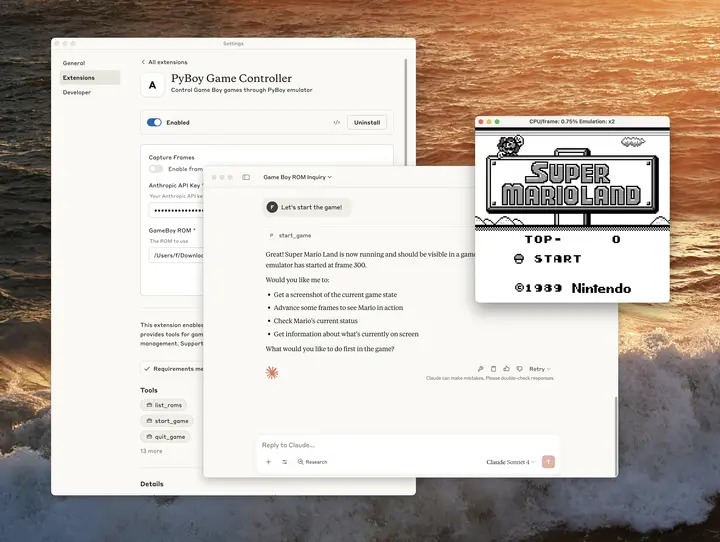
Anthropic 내부에서는 데스크톱 익스텐션을 활용해 실험적인 MCP 서버를 공유하고 있습니다. 재미를 위한 것도, 실용적인 것도 있습니다. 한 팀에서는 "Claude plays Pokémon" 연구와 유사하게, 모델을 GameBoy에 직접 연결하면 어디까지 진행할 수 있는지 실험하기도 했습니다. 인기 있는 PyBoy GameBoy 에뮬레이터를 실행하고 Claude가 조작할 수 있도록 하나의 익스텐션으로 패키징한 것입니다. 모델의 역량을 사용자가 로컬 머신에 이미 보유한 도구, 데이터, 애플리케이션에 연결할 수 있는 가능성은 무궁무진하다고 생각합니다.
여러분이 무엇을 만들어 낼지 정말 기대됩니다. 수천 개의 MCP 서버를 탄생시킨 바로 그 창의성이 이제 클릭 한 번으로 수백만 사용자에게 닿을 수 있습니다. MCP 서버를 공유할 준비가 되셨나요? 익스텐션 심사를 신청해 보세요.